Used drone 2025: Finn.no prices and 5 things you must check

Rune Millerjord
Photographer (Commercial & Adventure)
Nov 29, 2025
Used Drone 2025: Finn.no Prices and 5 Things You Must Check
A used drone can be a good buy and sometimes thousands cheaper than new. Many discover that they do not use their drone as much as they had thought, and you can therefore find some "bargains" on used drones on Finn.no. However, there are some things you should check yourself before you purchase.
1. C-marking and Drone Class
Check if the drone has C-marking (C0, C1, C2, etc.) on the underside. The C-class determines how close to people and buildings you can fly.
Drons without C-marking are called "legacy drones". The rules for these depend on weight:
Under 250 grams: Can still fly in the open category A1, fairly close to people
Over 250 grams: Must fly in the A3 category – at least 150 meters from residential areas and crowds
A legacy drone over 250 grams is therefore significantly less flexible than a C-marked drone. Always ask the seller if the drone is C-marked, and check the weight. A cheap legacy drone can become expensive if you cannot use it where you actually want to fly.
→ Unsure about the C-classes? Here is our complete guide.
2. Battery Health and Cycles
The battery is the most expensive part to replace on a drone. Always check the battery health before purchasing.
How to check in the DJI Fly app:
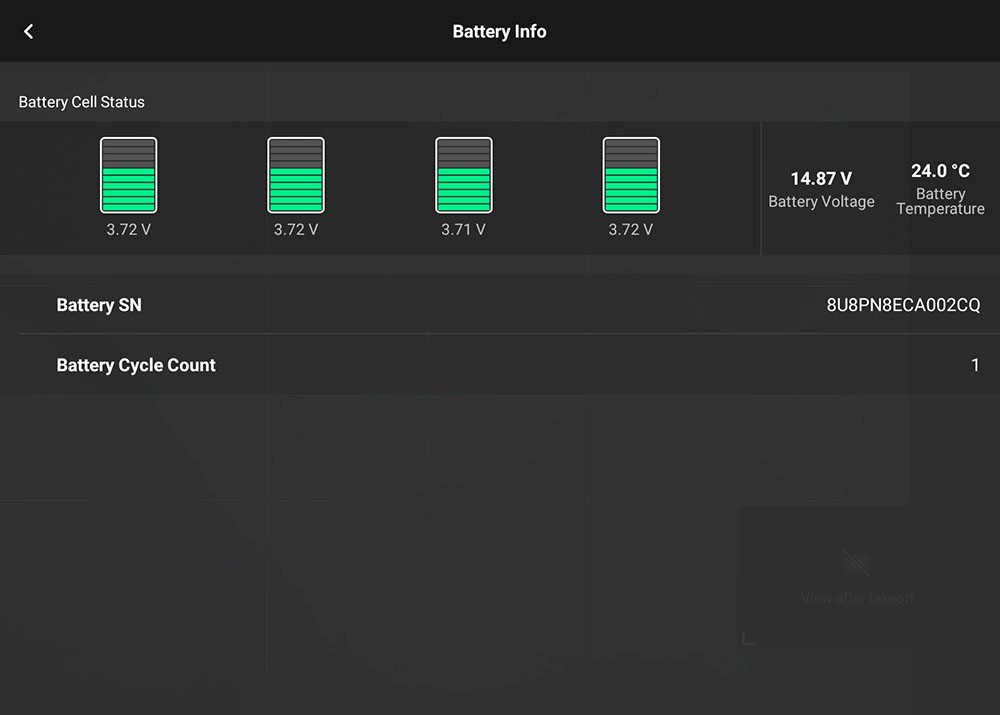
Connect to the drone, tap the three dots in the upper right corner, select Safety → Battery Info. Here you can see the number of cycles, cell status, and voltage per cell. If the seller has DJI RC Pro or RC Pro 2, the app runs on the built-in screen – ask them to turn on the drone and the controller so you can see Battery Info directly.
What is a Cycle?
One cycle means that 75% of the battery capacity has been used – not one full charge. So a battery charged from 50% to 100% does not count as a full cycle.
Rules of Thumb:
Under 100 cycles – like new
100–200 cycles – good used condition
Over 300 cycles – expect shorter flight time, adjust price accordingly
Red Flags:
Unbalanced cells (large difference in voltage between cells)
Swollen battery
Ask to see Battery Info before you purchase the drone.
3. Previous Damages and Wear
Ask the seller directly if "the drone has crashed?" Most answer honestly, and the answer gives you a clue about what to look out for. Many write about accidents or incidents directly in the "Finn.no" ad, but this does not apply to everyone.
A drone that has been down does not necessarily need to be a bad buy – it depends on how hard it hit and what was damaged. But you should know what you are buying. Some damages are visible, others only show up when you turn on the drone.
Physical Inspection – What to Look For:
Propellers: chips, cracks, wear
Gimbal: moves freely at startup, no shaking or jerking, check rubber dampers
Chassis: cracks, misalignments
Mismatched parts: if one propeller arm or panel looks newer than the rest, it may indicate repair after a crash
Sensors/camera lens: scratches, dirt
Signs of Internal Damage (often after a crash):
Gimbal that shakes or jerks on movement
Camera image flickering or dropping out
"Gimbal motor overload" error message in the app
If possible, ask for a short test flight to check that the drone responds as it should.
4. Firmware and Account Linking
This may be one of the most important points on the list, and many forget it, myself included. A drone still linked to the previous owner's account can impose restrictions that make it unnecessarily cumbersome after a second-hand purchase.
Account Linking – check that the drone is unlinked from the seller's DJI account
DJI drones are linked to a DJI account upon first use. When you buy used, the seller must remove this link before you can register the drone on your own account.
If this is not done:
The drone may have flight restrictions (limited altitude and range)
You lose access to DJI's support and warranty services
How to Check: Ask the seller to check "Device Management" in the DJI Fly app. There you can see if the drone is linked to the seller's account.
How the seller removes the link: Profile → Device Management → Select the drone → Remove Device from Account
The seller does not need to have the drone physically present – this can be done from the app.
Firmware – check that the drone is updated
Firmware is the software that controls the drone. Outdated firmware can cause flight restrictions, unstable flying, or prevent the drone from starting.
Before purchase – check the following:
That the drone connects to the DJI Fly app without error messages
That there are no pending updates
5. Receipt and Original Packaging
Remember to ask for the "original" purchase receipt. It may be more important than many think.
In Norway, as a consumer, you have the right to complaint for 5 years on defects caused by design or manufacturing. This means defects that should not have occurred with normal use. This applies regardless of the manufacturer's warranty, which for drones is usually 2 years (batteries have a shorter warranty: 12 months or 200 cycles, whichever comes first).
To be able to complain, you need documentation of the purchase. If you have the receipt, you can assert your right to complain even if the warranty has expired, provided that the defect concerns something that should have lasted longer.
Original packaging is not as critical, but it is definitely a plus. For many buyers, it signals that the seller has taken care of their equipment. And should you sell the drone on later, the original box and documentation help increase its value.
Used Prices on Finn.no (November 2025)
Before you buy, it’s good to know what to expect to pay. I checked Finn.no in November 2025 and noted typical prices for the most popular DJI drones.
Model | Segment | Typical Used Price |
DJI Mini 2 | Entry | 3,000 NOK |
DJI Mini 2 SE | Entry | 2,700 NOK |
DJI Mini 3 | Entry | 3,500 NOK |
DJI Mini 3 Pro | Entry/Hobby | 5,500 NOK |
DJI Mini 4 Pro | Hobby | 7,250 NOK |
DJI Mini 5 Pro | Hobby (new) | 10,000 NOK |
DJI Air 2S | Mid-range | 6,500 NOK |
DJI Air 3 | Mid-range | 10,000 NOK |
DJI Air 3S | Mid-range | 12,000 NOK |
DJI Mavic 3 Classic | Prosumer | 14,999 NOK |
DJI Mavic 3 Pro/Cine | Prosumer | 21,000 NOK |
DJI Mavic 4 Pro | Prosumer (new) | 19,500 NOK |
DJI Avata | FPV | 8,000 NOK |
The prices are guidelines and vary based on what is included. A drone with DJI RC 2 controller (with screen) typically costs 1,500–3,000 NOK more than the same drone with RC-N3 (without screen). Fly More Combo packages with extra batteries and bags also increase the price. Always check what is included before comparing.
Good luck with your purchase!