DJI removes geofencing: What does this mean for you as a drone pilot? (2025)
Rune Millerjord
Photographer (commercial & adventure)
Nov 18, 2025
DJI removes geofencing: What does this mean for you as a drone pilot? (2025)
DJI starts the global rollout of its new geofencing system on November 17, 2025. No-Fly Zones will be replaced by Enhanced Warning Zones – the drone will warn you, but will no longer stop flights automatically. Norwegian DJI pilots now have full responsibility to know and follow the Civil Aviation Authority's rules before flying.
What happened on November 17, 2025?
On November 17, 2025, DJI began the global rollout of its new geofencing system. This applies to all consumer and enterprise drones from DJI – with the Agras series following in December. In practice, this means that DJI removes the geofencing function that previously stopped the drone automatically in No-Fly Zones. Meanwhile, the GEO Unlock Request service will completely disappear during 2026.
Why is DJI doing this now? DJI believes the old system created more problems than it solved. The system was often stricter than Norwegian law, and unnecessarily blocked legal flights. The Civil Aviation Authority has been clear: "Manufacturers can design as they wish, but that does not override Norwegian regulations." DJI has received many complaints from pilots who were stopped from legal flights.
With the new solution, in many ways more responsibility is shifted from DJI's automatic system to you as a pilot. You will have greater freedom to fly where Norwegian law allows it – but it also means that you must know the rules before each flight. DJI still warns you but no longer stops you.
How do I get the update?
This is not a traditional firmware update you need to look for in the settings. Many drone pilots search for a specific version number or manual download, but DJI has solved this differently. The removal of geofencing occurs through three components: the DJI Fly or DJI Pilot app (where the new logic is), the FlySafe database (where airspace zones are defined), and automatic rollout when the drone is connected to the internet.
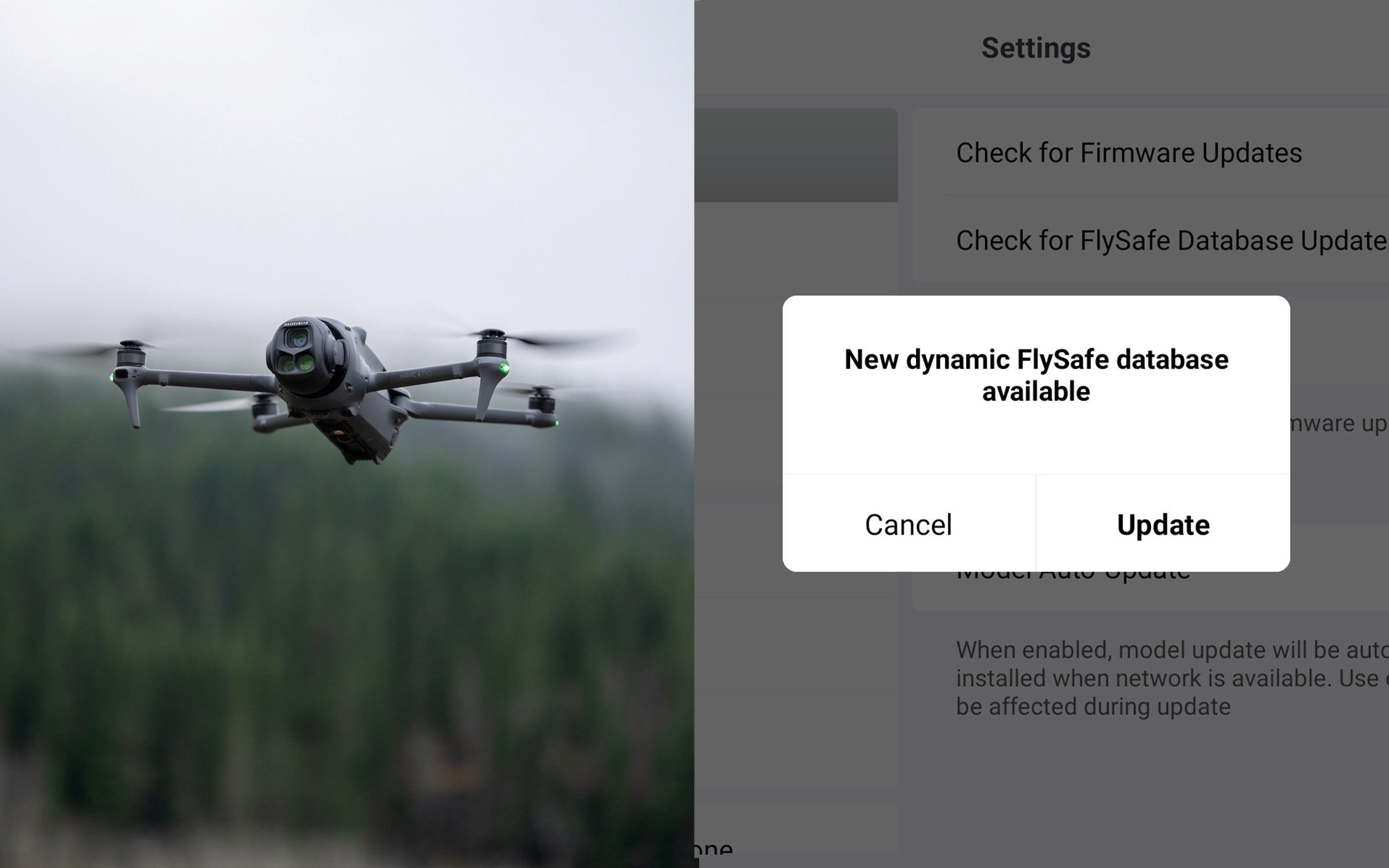
Here's how you know you've received the update: When you open the DJI Fly or DJI Pilot app, you will receive a FlySafe message to update the system. When you click "Update," the app downloads new airspace data from DJI's servers.
Previous No-Fly Zones now show as "Enhanced Warning Zones" in the app – you receive warnings, but the drone no longer stops you automatically.
From blocking to warning: What are Enhanced Warning Zones?
The difference between the old and new system is significant. Before, DJI automatically blocked takeoff in No-Fly Zones – you had to apply for GEO Unlock to be allowed to take off, even though in certain areas it was legal to fly. Now the drone shows "Enhanced Warning Zone" when you are in these areas, and you receive a warning where you must confirm that you take responsibility by accepting the warning "Enhanced Warning Zone: Proceed with caution." The drone no longer blocks takeoff.
Before (No-Fly Zones) | Now (Enhanced Warning Zones) |
DJI automatically blocked takeoff | DJI warns, but does not block takeoff |
Required GEO Unlock to fly | No unlock needed – you confirm responsibility via checkbox |
DJI decided where you could not fly | You decide (and are responsible) |
Often worked stricter than Norwegian law | Pilot must know Norwegian regulations themselves |
Let's look at a practical example with Oslo Airport: Previously, DJI blocked takeoff within their defined zone around the airport. You were informed that this was a No-Fly Zone and had to apply for GEO Unlock to proceed – even though you had legal permission from Avinor. Now you get "Enhanced Warning Zone: Proceed with caution" on the screen. You confirm the warning, and the drone lets you take off. It is still illegal to fly there without permission from Avinor – but DJI no longer blocks you.
This applies to all previous No-Fly Zones around airports. Whether it is Gardermoen, Flesland, Værnes, or other airports – the system warns you and asks you to confirm responsibility, but does not block takeoff. The responsibility for knowing and following the rules now lies entirely with you as a pilot.
What does this mean SPECIFICALLY for you as a Norwegian DJI pilot?
DJI's update gives you greater freedom, but also greater responsibility. Here are the three most important things you need to know:
1. DJI was often stricter than Norwegian law
DJI's old geofencing system sometimes blocked flights in places where it was legal to fly. The Civil Aviation Authority has confirmed that "manufacturers can design as they wish, but that does not override Norwegian regulations." Many pilots were stopped from legal flights because DJI's zones were too strict or incorrectly placed.
Now you have more freedom to fly where Norwegian law allows it – but it means that you must know the rules.
2. Norwegian law has NOT changed
Even though DJI's geofencing has been removed, no Norwegian drone regulations have changed:
5 km rule at airports (soon to be replaced by CTR zones)
Prohibited areas: Prisons, embassies, military installations
NSM sensor requirements: All drones with cameras must be registered (yes, camera = sensor)
Insurance: Still required for all drones
3. Penalties are real – Norwegian examples
Norwegian authorities actively enforce drone regulations. Here are concrete examples from recent months:
Svalbard, February 2024: A tourist received 12,000 NOK in fines and had the drone confiscated for flying within the 5 km zone around Svalbard airport without permission. The drone also flew at 500 meters altitude (maximum allowed is 120 meters).
Oslo, September 2025: A couple from Singapore were arrested for drone flying at Akershus Fortress. The man received 8,000 NOK in fines, the drone was confiscated, and a deportation case was initiated against him for flying in Oslo R-102 no-fly zone.
Enforcement:
The military reports ALL violations to the police
Deportation of tourists can occur for serious violations
Both fines AND confiscation of the drone are standard
"But I only fly for leisure – does this apply to me?"
YES. And here's why it's important to understand the change.
Before the DJI update, DJI automatically stopped you at airports through No-Fly Zones. This gave many a false sense of security. The issue was that DJI only covered airports – not national parks, Oslo R-102, NSM zones, or many other Norwegian prohibited areas. You could trust that the drone would stop you at airports, but not in other places where it is actually prohibited to fly.
At the same time, DJI's system was messy: Many pilots were stopped from completely legal flights because DJI's zones were too strict or incorrectly placed. The process to get GEO Unlock to open these areas was cumbersome and time-consuming – even though the flight was 100% legal.
After the DJI update, the situation has changed: The drone warns you, but does not stop you – neither at airports nor in other areas. This means that YOU must know what is legal before each flight. ALL Norwegian rules apply.
Let's look at some real hobby use scenarios: The cabin trip to Lofoten: DJI never stopped you in national parks (even before the update). In many national parks, it is illegal to fly; you must check yourself.
Conclusion: Hobby use carries the same responsibility as professional use.
Does this change requirements for certification or registration?
Short answer: NO
The removal of "geofencing" does not change anything regarding Norwegian requirements for registration, certification, or insurance. Everything remains as before:
Drone registration: 230 NOK/year at flydrone.no (all drones with a camera/sensor, or over 250g)
Insurance: Still required for all drones
A1/A3 exam: Still required and free at flydrone.no
A2 certificate: Only if you want to fly 5-30 meters from people (read more about what the A2 certificate gives you)
DJI's update only affects their technical system – not Norwegian legal requirements. You still need the same registration, exam, and insurance as before. Read our complete guide to drone regulations in Norway here.
How to update your DJI drone
The update occurs automatically when you connect to the internet. Here is what you need to do:
How to update:
Connect to the internet – WiFi or mobile data on your phone/tablet
Open the DJI Fly or DJI Pilot app
Wait for the FlySafe message – The app will show a pop-up message about the update
Click "Update" when the message appears
Wait – The update usually takes 10-15 minutes
Important to know:
Ensure that the drone is fully charged before the update
Do not interrupt the process while it’s ongoing
The update downloads new airspace data from DJI's servers
Without an internet connection, you will not receive the update
How to know the update is complete: Previous No-Fly Zones now show as "Enhanced Warning Zones" in the app.
Summary
DJI's removal of geofencing gives you greater freedom to fly where Norwegian law allows it – but also greater responsibility to know the rules. DJI no longer automatically stops you, and Enhanced Warning Zones are warnings, but the responsibility for following Norwegian rules lies with you.
Norwegian drone regulations have not changed. Before each flight, you must verify that the area is legal to fly in.
The three critical checks before each flight:
Airports – 5 km rule (check Ninox Drone)
Temporary restrictions – NOTAM on IPPC.no
Prohibited areas – NSM's map for military/sensitive zones
Unsure about Norwegian drone regulations? Read our complete guide to drone regulations in Norway (2025)